


Sunday, March 30, 2008


Increase Your Computers Internet Speed. Work On Dial-up & Broadband
HERE IS A SIMPLE WAY TO INCREASE UR INTERNET SPEED BY INCREASING THE BANDWITH UPTO 20% WHICH IS OCCUPIED BY THE COMPUTER FOR WASTE.MY BROADBAND SPEED WAS INCREASED BY ABOUT 25kbps.THE MORE SPEED U HAVE THE MORE IT WILLL INCREASE.BUT ATLEAST UPTO 20 kbps WILL B INCREASED FOR SURE.PLZ ADD REPS AND REPLIES IF U LIKE IT.IT WORKS ONLY FOR WINDOWS Xp PROFESSIONAL
Increase Your Internet Bandwidth
--------------------------------------------------------------------------------
Here's a simple little thing you can do to increase your bandwidth by at least 20%.
Ok here we go...
1.) log on as Administrator.
2.) start - run - type gpedit.msc
3.) expand "local computer policy"
4.) then expand "administrative templates"
5.) then expand "network branch"
6.) Highlight the "QoS Packet Scheduler"
7.) on right window double click "limit reservable bandwidth"
8.) on setting tab check the "enabled"
9.) change "Bandwidth limit %" to 0
You're done.It would be a good idea to reboot after this.
Increase Your Internet Bandwidth

--------------------------------------------------------------------------------
Here's a simple little thing you can do to increase your bandwidth by at least 20%.
Ok here we go...
1.) log on as Administrator.
2.) start - run - type gpedit.msc
3.) expand "local computer policy"
4.) then expand "administrative templates"
5.) then expand "network branch"
6.) Highlight the "QoS Packet Scheduler"
7.) on right window double click "limit reservable bandwidth"
8.) on setting tab check the "enabled"
9.) change "Bandwidth limit %" to 0

Saturday, March 29, 2008
Widget Box a Cool Site to get amazing Add Ons
 1)Firstly Where did i find it?
A few days back i was out browsing and i found this interesting site widgetBox.com has virtually everything you ever want. It has got something to give t . The first time you go there you might even not know what to get from the site. But after browsing a little am sure you'll find something for your liking . This siteo every blogger on blogosphere and even much much more.......
2)Secondly What sites does it support?
Well its format is html based so its supported mostly on every site . But these widgets are small additions to the blogging community websites such as blogger, typepad, wordpress etc.
3)Thirdly What are the requirements for running these on your site? Well the first requirement would be for your visitor to have an Internet connection . And now that's taken care off he should have an Adobe flash player installed which practically is needed on most of the websites on the Internet today. Without it the Internet would be a lifeless collection of pictures and typos. Well for the new ones who haven't got a flash player installed GOHERE.

4)Fourthly The menu and content of the site consists of?
Well it consists a wide range of widgets from all topics and meeting our requirements. It has lots of stuff you can choose from such as live weather update, virtual pets, games like mario, cookbooks, celebrities info's, count down timers, itunes, adsense toolbar and a lot more.......
Lets go in deeper on what all you can expect from this great site category wise. Blidgets these are RSS feeds of really famous sites . Well of course the
 ones on the first few pages others just have some catching up to do. Blogosphere well its mainly widgets for spicing up your blog but mainly it consists of games in their widgets. Well there are few things more that may catch your interests like google translator, bookmarking button which i already have told how to add in the previous post, ount downs, and o ther feeds widgets. Mixits are popular customized itunes compiler and player of all the latest hits. There a news widget where you have a different variety of stuff like weather updates , famous newpapers headlines from around the world, world map from google and a lot more so just browse and find out what this site has instore for you!! Today!
5th) Fifth How do i install them on my page?
- First select the widget you want . (Here i am selecting mario well to be honest i was playing it while i was posting up here).
- Now click on get widget the green little button.
- The page goes translucent now wait for a bit and choose the site on which you would like to display it up in there is a wide range of selection includes all the major sites and community based sites.
- Or if your not in any of those just choose the html code for the widget.
- For eg: If you have clicked on blogger you'll be asked to confirm then you click on add widget button again.
- It will open up a new window of the site you opted to put up the widget in. If your not logged in you'll be asked to login. Then what just click on the Add widget button and your now done!!


Friday, March 28, 2008
Adding Cute Little RSS Feedz Button to Your Blog!!!!

Adding feeds to your site?
1) Firstly know what is are these buttons and what do they do?
RSS feeds are basically a frequently updating content i.e. done by bloggers, news, podcasts etc.
These feeds give an easier and prominent solution to the problem of frequently visiting sites of your interests and keeping up-to-date with them. Even though the newest feed isn't the topic really of your interest you still have to go visit these sites over and over again...... But these new automated scripts keeps you updated on your favorite servers or user friendly sites such as google, yahoo, technorati , AOL ,vibes etc . So by adding these buttons your doing your visitors a favor by sending them the latest updates to the site of their choice and plus a bonus these make adorable little buttons to add.
2)Secondly What does RSS Stand for And how do i get my feed URL?
RSS (Really Simple Syndication) for futher and detailed Explanation About RSS visit http://en.wikipedia.org/wiki/RSS_(file_format). Well i really don't know for other blogging sites but for blogger your url is XXXXX.blogspot.com/atom.xml. Where XXXXX stands for your blog's name . For eg:- My RSS Feed URL is roshill.blogspot.com/atom.xml
3)Thirdly Where can i find them and how can i add them?
Well if your thirsty to add them all well lets just say its really quite hard to get them individually although i have a site where all these buttons have been compiled its easy and user friendly frankly i got mine from there so visit
 http://www.toprankblog.com/tools/rss-buttons/ to get your feed buttons NOW!!
4) Fourth Instruction on how to install them?
- Firstly goto the link above.
- Now just check the RSS button you wish to add to your site
- Choose the format and the blog you want to post it up in.(Note:These feeds are basically for blogs only if you have a website these might be worthless why? plz refer above!)
Now choose the style you want to display them in two columns etc.- Press create buttun at the bottom.
- Now copy the html code and paste it into the html/javascript of your layout page by pressing add elements button.

- Any questions or queries just comment me i will get back to you soon.
- Bonus Addition get a bookmark button now look at the picture
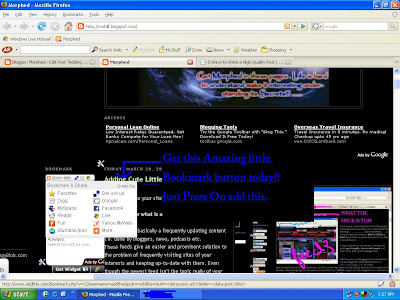 below!!!!


Friday, March 14, 2008
The Ground Hog Carols
 Murky and cute creature
The groundhog (Marmota monax), also known as the woodchuck, land beaver, or whistlepig, is a rodent of the family Sciuridae, belonging to the group of large ground squirrels known as marmots. Most marmots, such as yellow-bellied and hoary marmots, live in rocky and mountainous areas, but the woodchuck is a lowland creature. It is widely distributed in North America and common in the northeastern and central United States. In the west it is found only in Alaska, Alberta, British Columbia, and northern Washington.
Subscribe to:
Posts (Atom)
